Map Actions
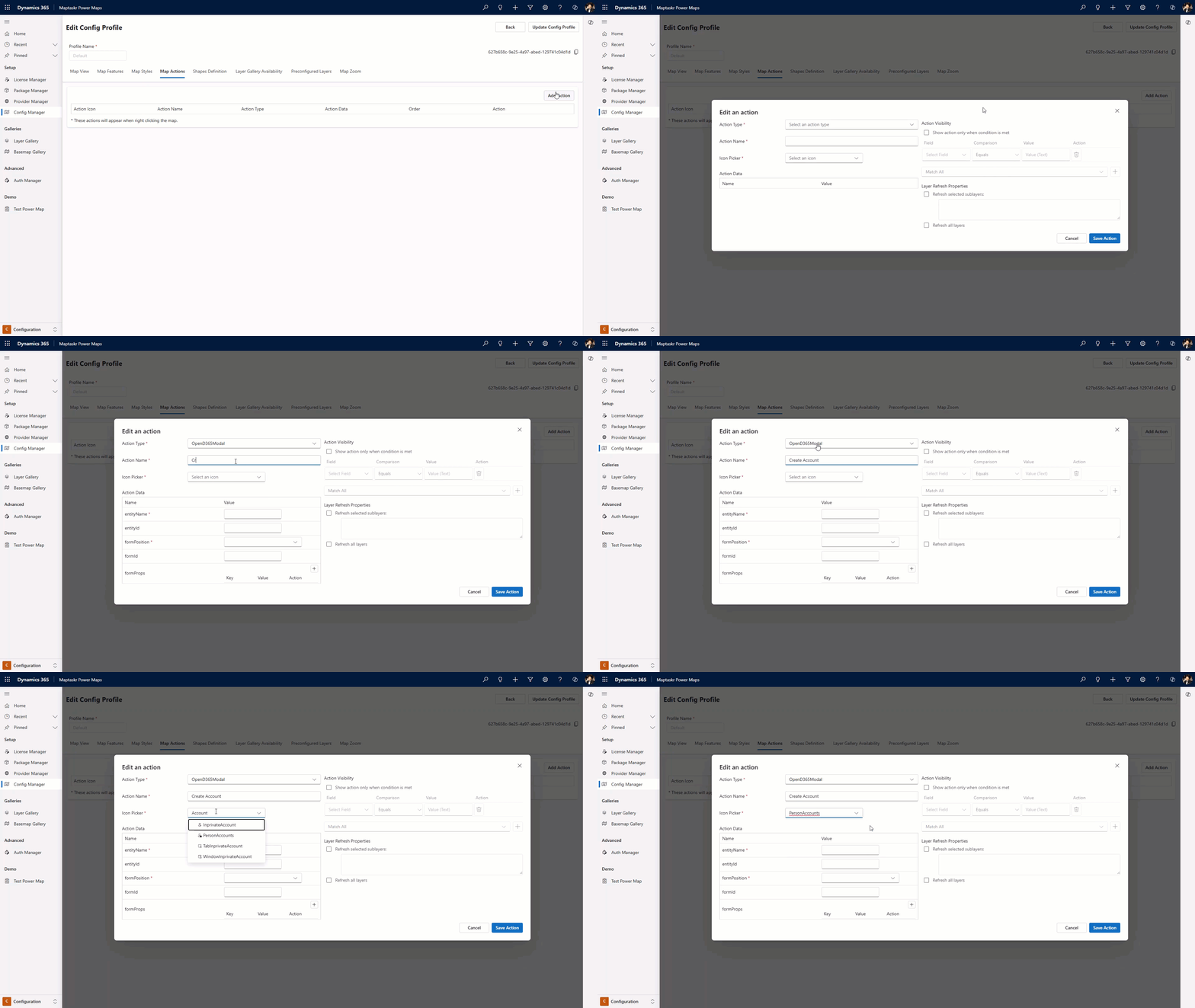
Within Map Actions, you can configure the right-click action within the map. Supported Action Types include ExecuteJs, HTTPRequest, OpenD365Modal, SetAttribute, and URLNavigate.
To add map actions, please refer to Adding a Map Action.
Adding a Map Action
-
Within the
Config Managerselect theConfig Profilethat you want to add the action to. -
Select
Map Actions. -
Select
Add Action. -
Select the
Action Type. Learn more -
Add an
Action Name. This will be the name in the right-click option menu. -
Search and select the icon which best suits your requirements (full list of available icons here).
-
Input the required
Action Data. -
Optionally, you can add conditional visibility.
-
Select
Show action only when condition is metto turn on condition checking. -
Enter the field, comparison and value to set a condition. To add multiple, select the plus button under the table.
-
If your action impacts a layer in any way, you can use Layer Refresh Properties to refresh either all layers on the map or specific layers by entering their names in the text field.
::: tip For a full list of available actions please go to Actions :::